GHydraulics integrates EPANET and QGIS
GHydraulics is a Quantum GIS plugin that allows to analyze water supply networks using EPANET. It also contains a function to calculate economic diameters based on given flowrates. The functions are accessible from the Quantum GIS plugin menu and toolbars.
Installation
You can use the Quantum GIS Plugin Repository to install GHydraulics.
Learn more on
on the Quantum GIS Plugin Repository GHydraulics page.
Detailed step-by-step installation instructions for QGIS 1.8 versions are available in a video:
Download
Starting with Quantum GIS 0.10.0 the GHydraulic plugin can be installed directly from Quantum GIS.
Sample data
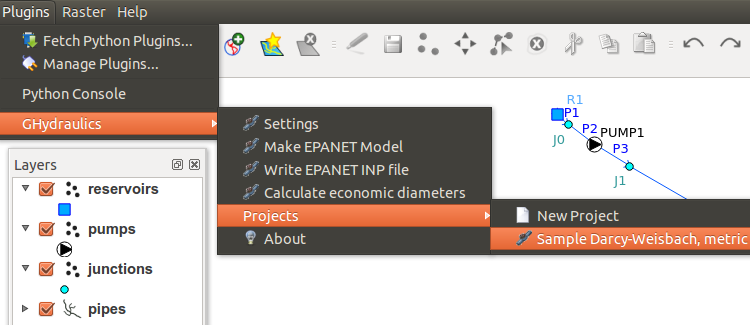
Sample data is available in GHydraulics itself. Select Plugins->GHydraulic-Projects and select one of the samples.
In addition: EExample data (a collection of shape files describing a simple hydraulic analysis model) is available in ZIP format: ghydraulics-samples.zip
It's recommended to use Darcy-Weisbach (D-W) and cubic meters per day (CMD) in the EPANET hydraulics options with this sample data.
Bugs and Problems
Please report all problems in the GHydraulics Bug Tracker.
Documentation
Blog
A series of GHydraulics-related blog posts explains how to use the software along with the current state of development.
Requirements
GHydraulics is a QGIS plugin and as such requires Quantum GIS (QGIS) in order to run. GHydraulics and QGIS are platform independent and run on Windows, Mac OS X and Linux.
Economic diameter calculation
The "Calculate economic diameters" function expects a RESULT_FLO field with the input. Output will be written to the DIAMETER field.
RESULT_FLO values are expected to be flow rates in l/s. The economic diameters are nominal diameters (DN) in mm.
The script will work for diameters from DN 80 to DN 1000.
A diameter of 9999 will be used to indicate where the RESULT_FLO flowrate exceeds the economic flowrate of DN 1000.
economicdiameter.py
If you want to use the commandline interface economicdiameter.py on Windows:
c:\Program Files\Quantum GIS\python needs to be in the PYTHONPATH:
set PYTHONPATH=%PYTHONPATH%;c:\Program Files\Quantum GIS\python
c:\Program Files\Quantum GIS needs to be in the PATH:
PATH=%PATH%;c:\Program Files\Quantum GIS
The script economicdiameter.py will fill the DIAMETER field with the economic diameter according to the RESULT_FLO field value.
Roadmap
At some point in the future, GHydraulics should fully integrate the EPANET engine into Quantum GIS. The DC Water Design Extension provides similar EPANET integration for ArcView GIS 3.*
Open Source
GHydraulics is open source software, written in the Python programming language. If you're a software developer, you may want to check out the GHydraulics Git Repository on Sourceforge:
sourceforge.net/p/ghydraulic/code-0/
License
The software is available for free (open source) under the terms of the GPL.
History
April 4, 2014: GHydraulics 2.1.8 released with several bugfixes for EPANET simulation runs and QGIS 2.2 support.
March 19, 2014: GHydraulics 2.1.7 fixes EPANET simulation run on some platforms.
January 12, 2014: GHydraulics 2.1.6 provides a new function to run EPANET simulations, reintegrates the economic diameter calculation, makes some functions use the Undo history and fixes all known bugs.
October 27, 2013: GHydraulics 2.1.4 INP fixes an INP writing bug.
September 9, 2013: GHydraulics 2.1.3 supports QGIS 2.0 and project reprojection.
August 11, 2013: GHydraulics 2.1.2 adds pipe length calculation via UTM reprojection (if necessary), robustness and usability improvements, optional backdrop map support and "New Project" and "Sample Darcy-Weisbach, metric" menu items.
July 29, 2013: GHydraulics 2.1.1 adds new option to calculate pipe length, bug fixes.
March 29, 2013: GHydraulics 2.1.0 adds checks and fixes for duplicate ids, missing junctions and multipart shapes.
February 23, 2013: GHydraulics 2.0.9 fixed valve writing bug, started with "Check Model".
January 20, 2013: GHydraulics 2.0.8 adds "Make EPANET model" function, fills NODE1 and NODE2 of Line tables.
June 13, 2012: GHydraulics 2.06 writes all network elements, fixes bugs and provides an updated package.
January 20, 2012: GHydraulics 2.0.4 allows to write EPANET INP files with junctions from QGIS.
April 11, 2010: GHydraulics 2.0.2 fixes problems with QT versions > 3.
January 29, 2009: GHydraulics 2.0.1 adds support for the Quantum GIS 1.0 API.
GHydraulic 0.x
GHydraulic 0.x is a simple hydraulic analysis engine that has become obsolete with the availability of EPANET.